geomy
Geomy is a client-side 3D mesh toolbox powered by Three.js.
This project was created to gather the 3D mesh tools
geomy
Cross-platform 3D mesh annotation tools for NumPy workflows.
Open geomy · Desktop downloads
About
Geomy provides tools for 3D mesh inspection, annotation, masking, segmentation, and alignment.
The application stays close to the source data. It does not silently weld, simplify, or re-index imported meshes. Vertex order and topology remain stable across inspection and annotation tasks, so exported indices and arrays still match the original mesh.
NPY and NPZ support makes geomy suitable as an interactive step in Python and NumPy workflows.
Tools
- 3D inspection: inspect geometry and scene properties, adjust the display, and show vertices, edges, normals, or materials
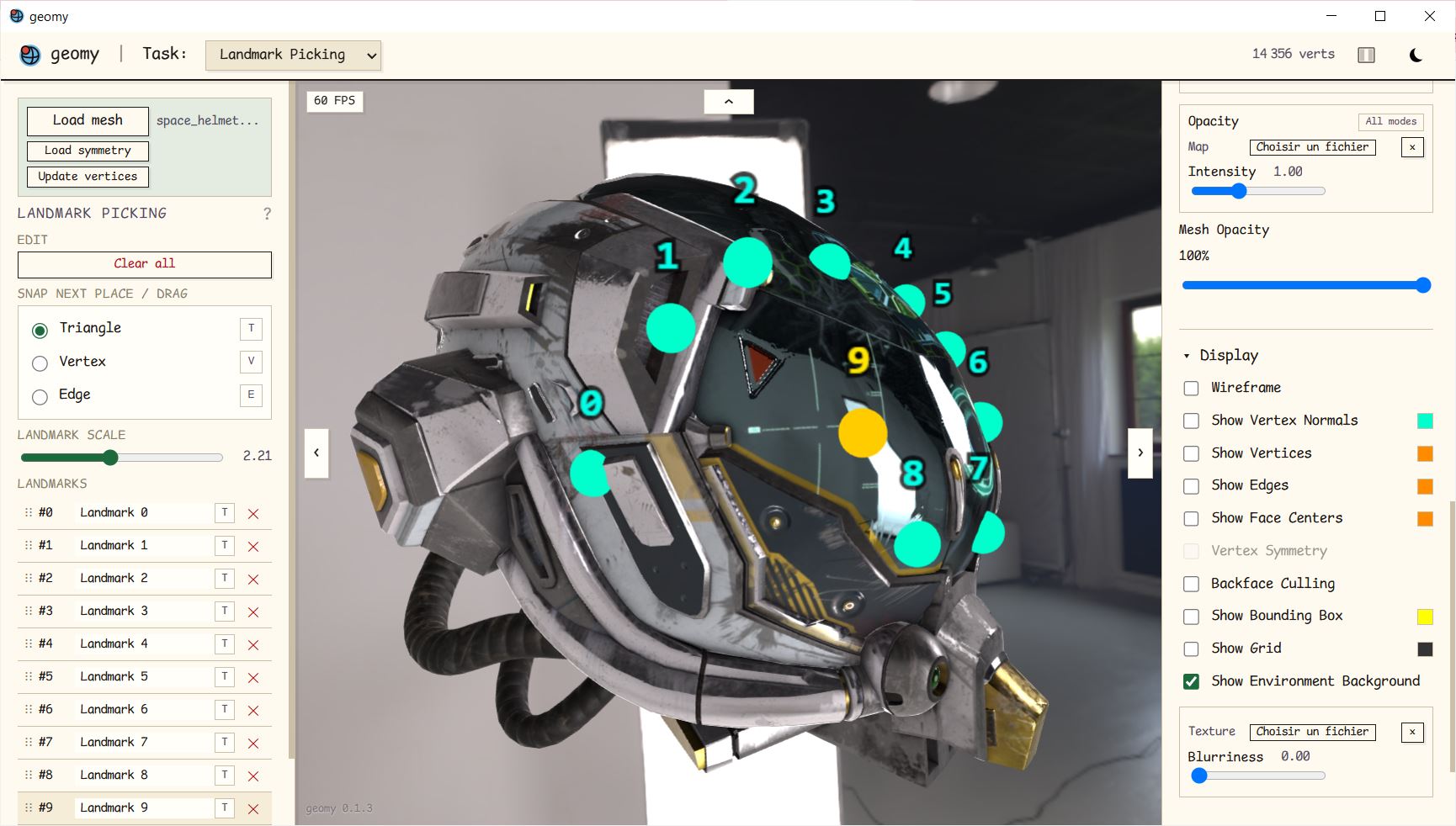
- Landmark picking: place vertex or surface landmarks, including symmetric placement
- Mesh masking: paint and manage vertex masks, use morphological operations, and combine masks
- Mesh segmentation: assign vertices to named regions and reorder or edit the segmentation
- Rigid alignment: align meshes from landmarks or selected regions and export transforms or vertices
Data and NumPy
Mesh files can be loaded from OBJ, STL, PLY, GLB, and GLTF. Task data can be imported or exported using formats suited to scripts and notebooks, including NPY, NPZ, JSON, and plain text where applicable.
Depending on the task, geomy can exchange:
- vertex indices and dense boolean masks
- segmentation labels and region masks
- landmark vertex indices or simplex and barycentric coordinates
- transformation matrices and transformed vertex arrays
Use geomy
Online
The hosted version is available at geomy.gker.fr.
Run from source
You need a recent version of Node.js.
git clone https://github.com/Kiord/geomy.git
cd geomy
npm install
npm run dev
The development server prints the local address to open in your browser.
Desktop builds
Desktop packages are published on the GitHub Releases page:
- Windows portable executable and installer
- Linux executable and
.debpackage - macOS
.dmgpackage
The desktop application uses the operating system’s native webview. On Windows, WebView2 is included with current versions of Windows and is available separately from Microsoft for older installations. The Linux build requires GTK 3 and WebKitGTK 4.1 from the distribution. Linux version currently suffers from slow-path WebGL rendering, prefer browser version.
Development
Run the unit tests:
npm test
Build the static web application:
npm run build
Run the Tauri desktop application in development mode:
npm run desktop:dev
npm run desktop:build
Building the desktop application requires the platform dependencies listed in the Tauri prerequisites.
Publishing a release
Update the version, commit it, and push the commit with its tag:
npm version X.X.X
git push origin HEAD --follow-tags
Pushing the version tag starts the GitHub Actions release workflow. It builds the web application and desktop packages, then attaches the generated files to the corresponding GitHub release.
Development of this project deliberately makes use of AI assistance